Nail Art Design: Paint Nails
- 4.0
- Rating
- 500.00K
- Installs
- Free
- Price
 Analysis by App-foxy
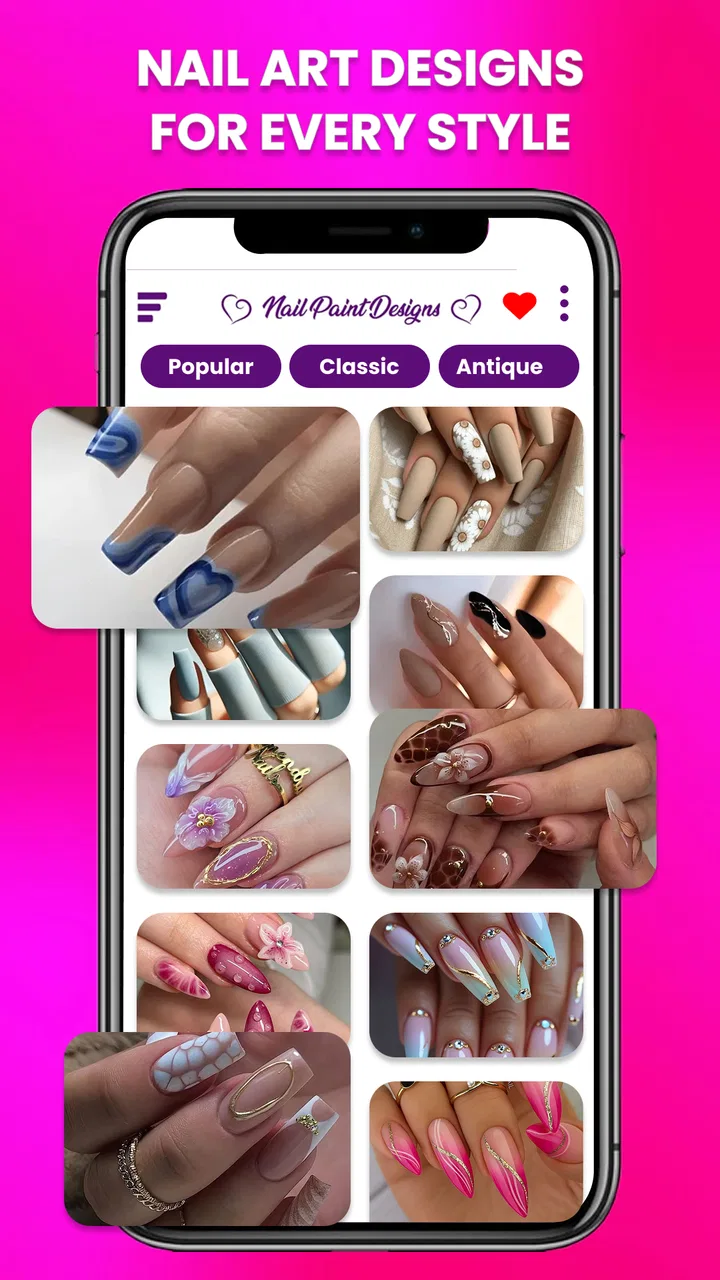
I went into Nail Art Design: Paint Nails expecting a simple idea gallery, but it is better understood as a small creative workspace for planning manicures and pedicures. The app sits in the beauty category and is made by JedyApps, with a free starting point and optional purchases that range from $0.99 to $14.99 per item. I found it most useful when I wanted to decide on a nail look before touching polish, rather than when I needed a complete professional salon tool.
The basic appeal is easy to understand: you can browse nail-art inspiration, experiment with combinations, and use the results to guide a real manicure. That makes it handy for someone who enjoys changing styles but often ends up choosing the same safe color. It also works for a beginner who wants a visual reference instead of trying to explain a design from memory. My overall impression is positive, although the experience depends heavily on how much creative control you expect from a mobile beauty app.
How the app feels in everyday use
The first thing I noticed is that the app is approachable. You do not need prior nail-art knowledge to get something from it. A person preparing for a weekend event, a holiday, or simply a fresh manicure can open it, look through ideas, and narrow down a direction without spending time learning a complicated editor.
You May Also Like

 Blood Strike: 2.5 Anniversary
Blood Strike’s Loadouts Turn Every Drop Into a Tactical Gamble
A close look at Blood Strike’s custom loadouts: how fast access to signature weapons reshapes its battle royale rhythm, rewards preparation, and narrows the gap between fights.

 Pandora - Music & Podcasts
Pandora’s Music Is Easy to Start, but Harder to Recover
Pandora’s strength is its low-effort path from a seed to a station. Its weak spot is how much confidence it asks you to place in connection, setup, and quiet recovery.

 8 Ball Pool
 Is Built on Rivalries, Rematches, and Routine
A close look at the rivalries, rematches, shared routines, and unanswered safety questions that turn a quick pool match into a persistent mobile community.

 Samsung Music
’s Quiet Strength Is Playing What You Already Own
Its reach comes less from spectacle than from dependable access to a personal library. That simplicity is both the app’s strongest retention engine and its ceiling.

 AccuWeather: Weather Radar
AccuWeather Review: A Quick, Clear Forecast for Everyday Decisions
For everyday plans, the best forecast is the one you can understand quickly. AccuWeather makes rain timing, radar, and local conditions easy to act on, with a few trade-offs.

 Hill Climb Racing
Why Hill Climb Racing Still Turns Crashes Into One More Run
A tiny car, a bumpy hill and one more upgrade: Hill Climb Racing keeps resurfacing because its simple chaos makes every near-miss feel personal.
More From Our News Desk



That simplicity is one of its strongest qualities. Rather than treating nail design like a technical drawing task, the app encourages quick visual decisions: do I prefer a soft neutral look, a brighter statement style, or something more decorative? I could use that process to create a short list of ideas before buying polish or booking a manicure.
A realistic use case would be getting ready for a wedding or a party. I would first save the general mood I wanted, then compare the designs with my outfit and accessories. From there, I could show a chosen reference to a nail technician or use it as a guide at home. This is more practical than scrolling randomly through social media, where inspiration is often mixed with unrelated content and difficult to organize.
It is also useful for a quick at-home session. If I only have a few colors available, I can use the designs as prompts rather than trying to copy every detail. A good trick is to focus on one element at a time: the base shade, the accent nail, or the placement of a pattern. That makes an elaborate-looking idea more realistic for someone working with an ordinary brush.
The app works best as a visual planning companion, not as a replacement for manicure technique. It can help me choose a direction, but it cannot make an uneven coat smooth or turn an ambitious pattern into an easy one. That distinction matters because many nail-art apps look impressive at first glance, yet their real value depends on whether the designs can be translated into something a person can actually wear.
Who will get the most from it
I would recommend it to beginners, casual beauty fans, and anyone who likes collecting ideas before visiting a salon. It can also suit users who enjoy experimenting with both fingernails and toenails, since the concept covers manicure and pedicure planning rather than focusing on only one area.
People who frequently feel stuck between several colors may find the visual approach especially helpful. Instead of asking whether a shade looks good in isolation, you can think about how it fits into a complete design. That small change in perspective helps with decisions such as whether a glitter accent is enough, whether a contrast color is too strong, or whether a pattern needs more empty space.
I would be less enthusiastic about it for professional nail artists who need precise measurement, advanced layer control, or a detailed client-management workflow. A salon professional may prefer a dedicated design tool, a large image library, or software that supports exact customization. This app is aimed more at inspiration and accessible experimentation than at producing production-ready nail diagrams.
What the current version adds to the experience
The current version is 2.4.3, and that is useful context for existing users. It shows that the app is not being presented as an untouched first release; it has moved beyond its original launch state. The app first appeared on July 5, 2023, so users who tried it earlier should judge the present experience rather than relying only on an old first impression.
I would not treat a version number as proof that every part of the app has been transformed. What it does tell me is that the product has had room to mature. For someone returning after a long break, the sensible approach is to update, explore the current design flow, and check whether it now fits the way they plan their nails. Existing users may notice a more settled product experience even if their favorite workflow remains familiar.
The audience around it is also meaningful. The app has passed 100K installs and holds an average rating of 3.8 from around 1.1K ratings. I see that as a sign of moderate interest rather than universal approval. It is popular enough to have reached a substantial group of Android users, but the rating suggests that expectations should remain realistic. Some people will enjoy the inspiration-focused format, while others will want more depth or a smoother creative process.
The app is available to Everyone, which matches its approachable subject matter. I still think younger users should treat it as a creative reference rather than a reason to buy products impulsively. For families, that broad age classification makes the concept easy to share, but the optional purchases are worth keeping in mind before handing over a device.
How I would use it without wasting time
My preferred workflow is to begin with a practical limit. I might choose two main colors and one decorative detail before browsing. This prevents the large variety of possible looks from becoming overwhelming. Once I find a design that fits those limits, I can simplify it instead of trying to reproduce every visual detail.
Another useful approach is to separate inspiration from execution. First, I decide on the overall style. Next, I identify which parts require tools I do not own, such as a very fine brush or a dotting tool. Finally, I adapt the design to what is available. This turns the app into a planning aid rather than a source of unrealistic expectations.
For a salon appointment, I would take a screenshot of the chosen idea and discuss substitutions with the technician. A design may look right with a particular color combination but work better with a different finish or a simpler accent. The app gives me a starting point for that conversation, which is more useful than showing up with only a vague description such as “something elegant.”
For pedicures, I would use a different standard. Toenail designs usually need to remain readable at a smaller scale, so I would avoid copying every tiny detail from a hand-focused idea. A single accent nail or a clean color contrast may translate better. This is one of the app’s practical strengths: it can spark ideas across both types of nail care, but the user still has to adapt the design to the surface.
Where it differs from ordinary alternatives
The usual alternative is browsing social platforms or searching image results. Those options can provide a much larger stream of inspiration, but they are less focused. I often end up seeing products, unrelated beauty trends, or designs that are difficult to trace back to a clear idea. A dedicated nail-art app feels calmer because the subject stays narrow.
On the other hand, broad image platforms may be better when I want current trends, real salon examples, or highly specific references. They can also make it easier to compare different creators and techniques. The trade-off is that they require more filtering, while this app is more convenient for someone who wants a direct path from browsing to choosing.
Compared with a professional design editor, Nail Art Design: Paint Nails is less intimidating but also less suitable for exact mock-ups. I would choose this app for a fast style decision and a specialized editor when I needed to test precise shapes, detailed placement, or a client-specific design. Neither option completely replaces the other; they serve different levels of commitment.
It also differs from simply looking at a salon menu. A salon menu is useful when I already know the service I want, but it can limit my thinking to a fixed set of examples. An inspiration app gives me more room to combine ideas mentally. The downside is that I must judge whether a design is achievable with my own skill level or worth requesting from a professional.
Small frictions and important trade-offs
The free price makes it easy to try, but the presence of in-app purchases means I would pay attention to which parts of the experience are included before becoming invested in a particular workflow. The purchase range reaches $14.99 per item, so the app can remain inexpensive for casual use, yet become less attractive if I expect to unlock a large amount of content.
That pricing structure creates a simple decision point. If I only need occasional inspiration for a manicure, the free access may be enough. If I want to use the app as a regular design library, I would first decide whether the extra material genuinely changes my choices. Paying for more options is not automatically worthwhile if I keep returning to the same few styles.
The rating of 3.8 also hints at a mixed experience across its audience. I would not interpret that as a reason to avoid the app, but I would avoid expecting the polish of a high-end professional platform. The best way to approach it is with a specific goal: find a design for an upcoming appointment, test a color direction, or collect ideas for a home manicure.
Another limitation is the gap between visual complexity and real execution. A design may be attractive on screen but require patience, steady hands, or tools that a beginner does not have. I recommend simplifying first rather than abandoning the idea. Keep the base color, remove one layer of decoration, and turn a detailed pattern into an accent nail. That usually preserves the character without making the manicure frustrating.
What returning users and new users should watch
New users should pay attention to how quickly the app helps them make a decision. If browsing produces clear ideas and practical references, it is doing its job. If the process only creates a long list of designs that are never used, I would switch to a more structured method and browse with a color or occasion in mind.
Returning users should watch how the current 2.4.3 experience fits their established habits. Product evolution matters most when it removes friction from a task they repeat. Someone who already used the app for salon references may value a smoother browsing routine, while a person hoping for a full professional editor may still find the concept too limited.
I would also keep an eye on how optional purchases affect the balance between casual access and regular use. The app is free to install, which lowers the barrier to testing it, but the right value judgment depends on whether the available content supports your personal style. A user who prefers minimalist nails may need far less than someone who wants a new themed look every week.
For anyone concerned about device compatibility, the app supports Android 7.0 and later. That makes it accessible on a broad range of Android phones, including devices that are not recent. The developer is JedyApps, and the app’s broad age classification makes it straightforward to understand before installation.
My recommendation after using it
I see Nail Art Design: Paint Nails as a friendly, focused option for turning vague beauty ideas into a concrete manicure plan. Its strongest use is not technical editing; it is helping me decide what I want, communicate that choice, and adapt an attractive design to my own ability or a salon appointment.
I would recommend trying it if you enjoy nail art, need inspiration for a specific occasion, or want a less distracting alternative to general-purpose image browsing. I would skip it if your main requirement is precision design software, advanced customization, or a professional record of client work.
In the end, the app earns its place as a free starting point with optional paid extras, provided I use it with realistic expectations. It gives me ideas and a practical visual reference, while the actual quality of the manicure still depends on preparation, tools, and technique. For casual Android users who want to make their next manicure feel less repetitive, that is a worthwhile role.
FAQs for Nail Art Design: Paint Nails
01What features does Nail Art Design: Paint Nails offer?
Nail Art Design: Paint Nails provides a wide array of features, including a vast collection of nail polish colors, intricate nail art designs, and customizable options to create your unique nail look. The app also offers tutorials and tips for beginners and experts alike, helping users enhance their nail art skills.
02Is the app free to use, or are there in-app purchases?
Nail Art Design: Paint Nails is free to download and use, offering basic features at no cost. However, it includes in-app purchases for advanced design packs, exclusive polish colors, and ad-free experiences. These purchases enhance the app's functionality and provide more creative options for users.
03Is an internet connection required to use the app?
While Nail Art Design: Paint Nails can be used offline for basic features, an internet connection is recommended for accessing additional content, downloading new design packs, and syncing your creations across devices. Online access also ensures you receive the latest updates and improvements.
04Can I share my nail art designs on social media?
Yes, the app allows you to easily share your nail art creations on various social media platforms. With just a few taps, you can showcase your designs to friends and followers, helping you connect with a community of nail art enthusiasts and gain inspiration from others.
05Is Nail Art Design: Paint Nails suitable for all skill levels?
Absolutely! Nail Art Design: Paint Nails is designed for users of all skill levels. Beginners can benefit from step-by-step tutorials and simpler designs, while more experienced users can challenge themselves with intricate patterns and advanced techniques. The app grows with you as your skills develop.
Pros
- Wide variety of nail art styles.
- Easy-to-use interface for beginners.
- Regular updates with new designs.
- Offline mode available for convenience.
- High-quality graphics enhance experience.
Cons
- Limited free design options.
- Ad interruptions can be frequent.
- No option for custom design uploads.
- Some features require in-app purchases.
- Occasional app crashes reported.

Nail Art Design: Paint Nails
Gallery